iPhone Cases: Sleek & Minimal

As far as iPhone cases go: I like them to not add bulk and just protect from scratches. Specifically I like them to protect the phone back from getting scratched when put on a table, desk, or else. The beauty of the iPhone is it’s sleek design, adding a clunky case negates that. The other thing I like in a case is some grip (not as much grip as a silicone skin, too difficult to get out of your pocket when driving) but enough grip to keep it from sliding off your leg if balanced on your leg while driving. I’ve found 2 that are winners in that fashion.

moshi_lgMoshi iGlaze 3G:

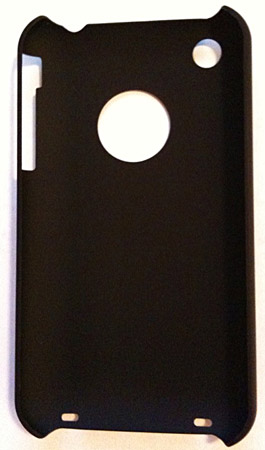
Recommended by a friend this case is by far the best. All important buttons are easy to access especially the ring/silent toggle. It’s slim and doesn’t add any bulk to your phone. There is a cutout to show the apple logo: I know it’s brandishly ridiculous but that in my opinion is part of the beauty of the phone. The Moshi case includes both a screen protector, and little circle to protect the apple logo. It’s grippy, but not too grippy. This case is the best so far by my criteria (see above). It’s also only just over $20. Making it a clear winner.

Power Support Air Jacket:

The black case was my fav for the last year+. Recently got a clear one and it’s great, but it doesn’t have the slight grippy feel of the black jacket and is a bit slippery. The Black case was good but not totally what I wanted. I scratched the covering off my black case to reveal the apple logo, worked ok, but it was a bit barbaric. As stated above I know it’s ridiculous, but part of the beauty of the phone (see above). My only complaint was that the case did make toggling the ring/silent switch a bit difficult. Everything else was great. These cases are around $35.

2 Comments »


The new iPhone: What surprised me

iPhone-3GSThere are tons of articles out there as to what the new iPhone 3GS and OS 3 have to offer, why it’s not a big deal, and in depth analysis of each little new feature. I don’t plan to reiterate that. I love my new 3G S, mostly for the main reason I upgraded SPEED, (after all that is what the S stands for) but as I get to explore it more there are some stunning, innovative and surprising new awesome-ities to it. Like to hear it: Here it go.

1) Fingerprint-resistant oleophobic coating: While not largely publicized this enhancement is

You Can't Touch This!

You Can't Touch This!

waaay cooler than it sounds. Initial shots of the new 3GS showed a matte screen which I wasn’t too excited for, however the screen is no more matte than the original 3G only it wipes clean much easier. How much easier? So much easier, that Apple didn’t include an official screen cleaning cloth in the packaging this time. Here’s a recent explanation from Bill Nye (the ol’ science guy) as to just how it’s done, if you care for a kind of scientific explanation.

2) Video: While billed as a main new feature; this new addition is much cooler than I expected. Its so because in Apple’s typical way, it does it better and more amazingly than anyone else’s phone can. You can not only shoot video at a full 30 fps, you can edit it right on the phone. I’ve been enjoying it much more than I thought I would. In a story posted today youtube uploads are up 400% since the release of the iPhone 3GS.

3) Compass:  I loved the idea for this from the beginning, however I don’t get to camp as much as I used to… so why do I like this? Because it gives me a useful sense of direction. While co-piloting with google maps en-route it automatically rotates the map so you know which way to to turn. Subtle but awesome none the less. I’m sure it’s also quite useful if you use your phone to get walking directions in the city (any city will do).

4) Behind the scenes enhancements: While many haven’t followed the recent developer’s events, I have. Enhancements behind the scene’s in the new iPhone OS 3 are going to make all the difference. I’m not talking about copy & paste. Much like the iPhone SDK for OS 2 ushered in third party apps with the launch of the 3G, these new enhancement/capabilities are going to open the door to the coolest apps you can image. TomTom previewed their new turn by turn app for iPhone and their new cradle (not out as of yet, but I can’t wait) The iPhone can now through the dock connector communicate and control things that are attached. For example, it can connect to a glucose meter to help a diabetic regulate insulin or monitor blood pressure through a specially designed cuff. The options are literally limitless, I can’t wait to see what’s developed next (and wish I’d thought of it).

For most people the differences are negligible: not to me. That’s just how I roll.

No Comments »


Notes you can access from anywhere

Visit evernote.com »

I, like many, have spent several years trying to find a good way to create and access notes no matter where I am. In fact having notes and my calendar on my at all times is a driving factor in getting an iPhone. A couple of years ago Thrillist did a piece on an application called Evernote which I’ve been using ever since. It’s available on Mac, PC, iPhone, and now Blackberry.

It auto-magically sync’s your notes through a free account you can setup through their website. The free account allows you to store several image formats and files in your notes (including JPG, GIF, and PDF’s). They also have premium paid account that allows you sync anything and any format, large data storage cap, as well as SSL encryption, no ads in the desktop client, and more.

I’ve never needed to upgrade from the free account and I use it quite a bit. I find it extremely useful for packing lists, home improvement project diagrams, cellphone pics of something to match at the hardware store with notes, etc.

While so many are complaining about the lack of notes sync on the iPhone, I find it a moot point, since I’ve been using Evernote to do that since they released the iPhone App.

2 Comments »


iPhone fit | Part 3 :: Tracking Your Runs

Over the last month I’ve started running, something I always made excuses for before. It doesn’t hurt my knees nearly as much as I’d thought it would. Maybe it’s just that I’m wearing the right shoes now, who knows, but I like it. Breaking each goal is part of my motivation. Enter Pace, Path Tracker, & Run Keeper iPhone Apps.

pace

Pace »

Pace: This is a great app to track your runs be them on a treadmill or on pavement. Enter your info and track progress against your set goals. It calculates calories burned based on the info you provide and will keep track of the miles on your shoes, so you know when to replace them. It’s a fantastic all around running log. It does not GPS track your runs though, both an advantage and the cause for additional apps. Goals… April 13-30 run 18 miles: done. Run 3 miles on the road by April 30: done. Leave your iPhone at home and time your self on a watch.

path_tracker

Path Tracker »

Path Tracker: My first download for tracking walks, biking, hiking and running. It’s ok but the interface is rudimentary and support is minimal. If you live in an area where GPS signals are low it won’t work well. Good for biking I’ve found, however when I tried going for a run with my iPhone strapped to my arm, it recorded 4.265 miles when I’d run 1.5mi. It allows you to upload trips to their website and map and other data over the course of your trip, but poor for walking and running where I live.

run_keeper

Run Keeper »

Run Keeper: Allows you to track your activities by type. Running, Walking, Biking, Skiing, Etc. It’s results have been better than Path Tracker, however not perfect. It provides interesting stats on speed and elevation throughout your tracked activity. The pro version provides voice prompts on selected milestones (aka every mile traveled). Their website is nicer than path tracker’s and allows you to export your route to Google Earth or share it with friends. It also shows your mileage by month and type along with several other reports. While not always perfect I find it helpful to export the data to Google Earth and trace it out to check distance. Then add the raw data back into Pace.

1 Comment »


iPhone fit | Part 2 :: Workout Log

This nice little iPhone app I’ve found allows you to setup workouts and track your progress. Much like the people you see at the gym with low-tech clip-boards, you can track your progress on each exercise/piece of equipment and still listen to music all while not carrying around a clip board (with an iPhone or iPod Touch).

iFitness »

iFitness Free »

iFitness:

This app gives you some basic advice on working out. It also allows you to create workouts by muscle type or whatever you deem important and track your weight and reps by exercise. It also has a timer to track resting time (although I haven’t gotten that feature to work out yet.) It’s a good all around gym notebook from my experience.

No Comments »


iPhone fit | Part 1 :: Getting fit with technology

I love technology. I consider my iPhone an essential part of my daily routine. Recently I heard an apple commercial talking about “if you want to find out how many calories are in your lunch…. there’s an app for that.” Well I did, so I downloaded it for free and it’s sparked a healthy revolution I never expected.

lose-it

Lose It! »

Lose It! – This app is great, it’s Free! I’ve never paid any attention to the caloric content of food before. As a result, I have no idea how many calories I consume in a day, nor how many I should be. Enter Lose It!, I’ve been using this to track my eating habits and eventually know how roughly what I’m consuming and make smarter decisions. It’s fantastic, easy to use, easy to add what you eat and track your caloric intake. Lose It! makes it easy to set goals for weight loss and add exercise in any form to your daily log! (essentially allowing you to consume more calories*) This app has been the impetus to a lot of changes in my daily routine. Knowing is half the battle.

*sticking to the caloric recommendations regardless of exercise, then adding exercise, is the best way to loose weight. However, to just live better and loose some weight along the way, you can add exercise to allow you to eat more calories. It works too.

This app and added exercise got me working out on a regular basis. Which is saying something since I hadn’t done any intentional physical exercise in around 12 years. Now I’m going to the gym regularly: go figure.

No Comments »